

Muzoink Generations Player
Version 0.1.0 · Published by Muzoink · © Charles H. Jerred III
Minimalist ambient acoustic music player generating calm, royalty-free background soundscapes locally on your device.
Core Capabilities
- Generative Multi-Layer Engine: Real-time procedural composition across 22 musical scales, 6 musical styles, 3/4 and 4/4 time signatures, voice-led pad inversions, bar-level figurations, and motif-driven melody and counterpoint.
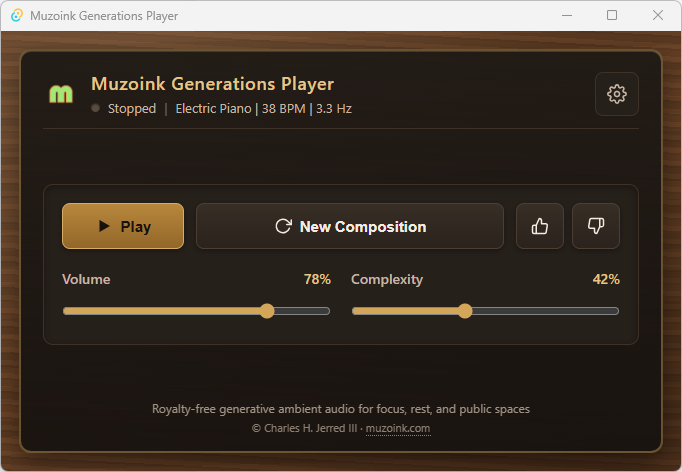
- Acoustic Synthesis & Modulation: Built-in Piano, Vibraphone, and Electric Piano voices rendered with flocking dynamics, algorithmic reverb, and optional 1.5–6.8 Hz amplitude modulation.
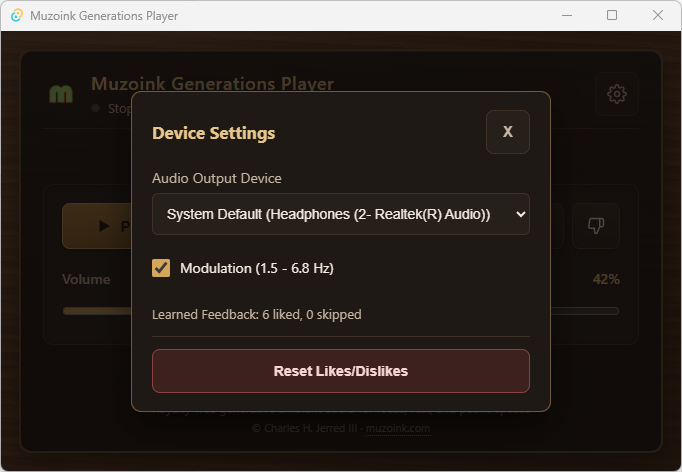
- Local Preference Learning: Thumbs Up and Thumbs Down feedback adapts voice, style, scale, tempo, and warmth weights locally—with one-click reset and zero cloud tracking.
Walkthrough Video
Screenshots
Local Data Path
On Windows, your learned preference profile (player_preferences.json) is stored inside:
%LOCALAPPDATA%\com.muzoink.muzoink-generations-playerControls & Configuration Reference
Expand any category below to inspect controls, defaults, and behavior.
Transport & Mixing Controls (5)
| Control | Summary | Details |
|---|---|---|
| Play / Stop | Start or smoothly fade out real-time generative playback. | Starts streaming continuous procedural audio or triggers a smooth fade-out before stopping. |
| New Composition | Generate a fresh seed, voice, scale, style, and tempo. | Samples a new composition configuration weighted by your local preference profile. |
| Thumbs Up / Down | Train local preference weights for future compositions. | Reinforces or reduces weights for the active voice, musical style, scale, tempo center, and warmth. Thumbs Down also skips to a new composition. |
| Volume | Adjust master output gain (0–100%, default 78%). | Smoothly scales the synthesizer master output level in real time. |
| Complexity | Adjust harmonic, rhythmic, and contrapuntal density (0–100%, default 42%). | Controls chord extensions (triads, 7ths, 9ths), rest density, counterpoint activation, chromatic color, and motif mutation rates. |
Device & Preference Settings (3)
| Setting | Summary | Details |
|---|---|---|
| Audio Output Device | Select the active system audio output device. | Defaults to System Default and switches live across available WASAPI/CoreAudio/ALSA output devices. |
| Modulation (1.5 - 6.8 Hz) | Toggle subtle low-frequency amplitude modulation. | Applies a gentle 1.5–6.8 Hz breathing modulation depth to the synthesized output when enabled. |
| Reset Likes/Dislikes | Restore default sampling weights and clear vote counts. | Resets learned voice, style, scale, tempo, and warmth weights back to their initial defaults. |